
What Moraware JobTracker actually does (and what it doesn't)
Moraware JobTracker was, and its successor Systemize still is, a job scheduling and tracking tool. It shows the job on a calendar, moves it through stages from template to install, and stores customer information tied to that job. That's real work, and shops that came off a whiteboard swear by it in year one.
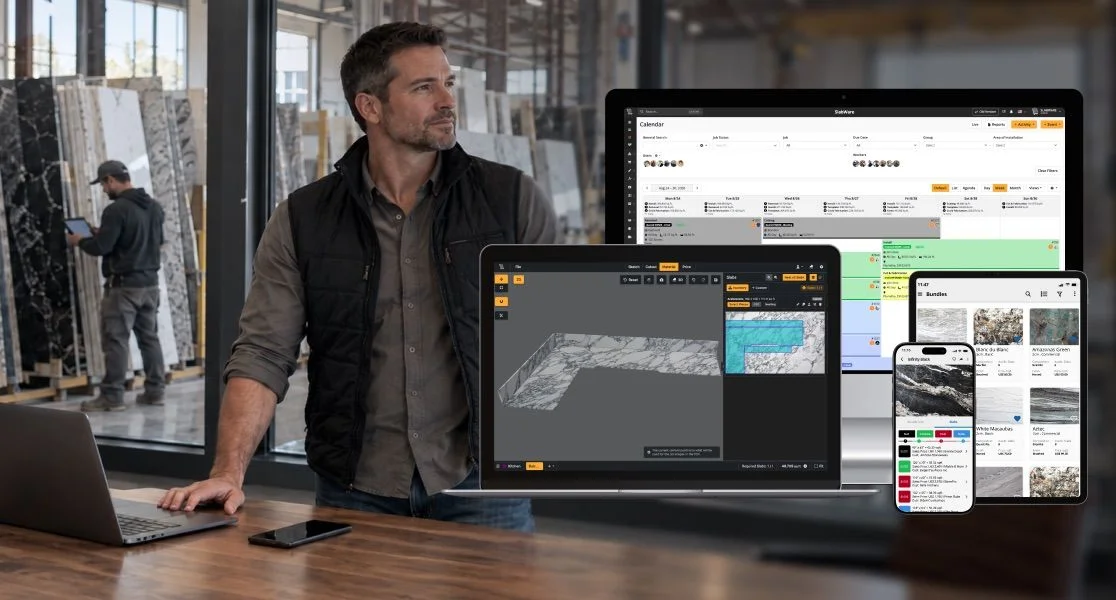
Here's what it doesn't do: it doesn't see the slab on the rack, it doesn't build the quote, it doesn't draw the countertop, and it doesn't talk to your CNC. Those are separate purchases, in separate logins, kept in sync by typing.
The four-system tax nobody puts on the P&L
A shop running JobTracker properly almost never runs only JobTracker. The full stack usually looks like this:
- JobTracker for scheduling and status
- A slab yard app or spreadsheet for inventory
- A quoting or estimating tool (or QuickBooks estimates) for pricing
- A drawing tool for the top itself, usually AutoCAD or CounterGo
Four subscriptions, four logins, and the same customer name typed four times. When a slab gets consumed on Monday, nothing tells the quote tool it's gone, and nothing tells JobTracker that job 2138 is now waterfall-short. That gap isn't a Moraware problem. It's a job-tracker-only problem.
Where JobTracker shops hit the ceiling
The moment shops start looking for a Moraware JobTracker alternative is usually one of these:
- A salesperson sold a slab that was already tagged to another job, because the quoting tool and the yard didn't share the same reservation.
- A quote went out at last month's material cost, the actual slab came in higher, and the margin gap only showed up at invoice time.
- The template came back short, the drawing was fine, but the drawing didn't know which remnant existed and cut a new slab that didn't need to be cut.
- A job showed 'installed' in JobTracker while the pieces were still on the fabrication cart. Nobody had updated JobTracker because JobTracker is where the office lives, not the shop floor.
What a Moraware JobTracker alternative should actually replace
If you're shopping for a replacement, don't just shop for a better calendar. The list of things a real alternative needs to fold in:
- Photo-by-photo slab inventory the salesperson can pull up on a phone from the customer's kitchen
- Quote and invoice that pulls from that same inventory and locks the slab as soon as the customer signs
- Drawing that reads the actual slab, considers remnants first, and exports DXF for the CNC or water jet
- Job tracking that updates when the shop scans the slab, not when the office remembers to log in
- Native mobile so template, install, and yard staff use the same system the office uses
If any of those live in a second tool, you're not off the four-system tax. You just relabeled it.
Side by side: Moraware JobTracker and SlabWare
| Capability | Moraware JobTracker | SlabWare |
|---|---|---|
| Job scheduling and stage tracking | Yes, core strength | Yes, and tied to the actual slab consumed |
| Photo-by-photo slab inventory | Not included | Native, every slab tagged with its own photo |
| Quote and invoice inside the platform | Not included | Built in, reserves the slab at signature |
| Drawing with DXF export to CNC and water jet | Not included | Built in, remnant-aware |
| Native iOS and Android for yard and template crew | Web focused | Native app used on the floor and in the field |
| Vendors on the invoice for a complete stack | Typically 3 to 4 to cover a full shop | One vendor, one login, one contract |
| Fit for a stone shop | Job tracking on top of your existing stack | Full stone shop stack, used by 379 shops |
Your first week on SlabWare after leaving JobTracker
The first week isn't about features. It's about killing the double entry JobTracker forced you to live with. In order:
- Day 1 and 2. Your slab yard gets photographed and loaded. Every slab that exists now has one record with a photo. The pretend inventory in the spreadsheet is retired.
- Day 3. Your first quote goes out from SlabWare. When the customer signs, that specific slab is locked. The salesperson sees it on their phone from the showroom.
- Day 4. The drawing gets built in SlabWare against the actual slab, remnants get considered first, and the DXF goes to the CNC without a second round trip.
- Day 5. The job scan on the shop floor updates the job status by itself. The office stops typing status updates that were the whole reason JobTracker felt useful.
By the end of week one, the ritual of retyping the same customer into four systems is gone. That's the actual switch, not the feature list.
How the switch itself works
Migration off JobTracker into SlabWare usually takes two to four weeks. Most shops keep JobTracker running in parallel for 30 days after go-live, so open jobs finish where they started and new jobs open in SlabWare. Your existing job history exports out of Moraware and gets loaded, so you don't lose the record of jobs closed last year. Nothing about the switch requires stopping production.
Frequently asked questions
Is Moraware JobTracker still being developed, or was it replaced by Systemize?
Moraware moved its job tracking product forward as Systemize. If you're still on the older JobTracker, you're on a product line that isn't the current focus, which is one reason shops are re-evaluating now instead of waiting for the next forced upgrade.
My team is already trained on JobTracker. Will they actually use a new system?
The learning curve is real but shorter than shops expect, because most people on the floor stop typing and start scanning. Yard, template, and install crews use the SlabWare mobile app the same way they used JobTracker in a browser. The office side does more of the setup up front, and the shop floor does less every day after that.
Will I lose my job history if I leave JobTracker?
No. Historical jobs export out of Moraware and get imported into SlabWare during setup, so you keep the record of every job you have closed. Your JobTracker account also stays live for 30 days while you run in parallel, so nothing is lost even if a customer calls about a 2023 install in your second week on the new system.
If I have SlabWare, do I still need a separate slab yard app?
No. Slab yard inventory is one of the products inside SlabWare, not an add-on. Every slab gets its own photo and record, the salesperson sees the yard from a phone in the customer's kitchen, and the slab reserves automatically when the quote is signed. That single fact is one of the main reasons shops leave JobTracker.
How long from signing with SlabWare to running actual production on it?
The typical range is two to four weeks. That includes photographing the yard, importing history, training the office, and rolling the mobile app out to the shop floor. Most shops go live on new jobs while their remaining open jobs finish inside JobTracker.
Is SlabWare more expensive than stacking JobTracker with a separate inventory and quoting tool?
SlabWare is one contract instead of three or four, so the sticker often lands close to what shops already spend on the stack. The savings show up when you stop paying for double entry, remakes from stale inventory, and slabs sold twice. Confirm the exact SlabWare number in a demo and compare it to everything you spend today, including the tools nobody bothers to count.
Want to know more about SlabWare? Visit our site and get in touch!
If you prefer, you can read other posts in our blog here.
Keep reading