

Get notifications about payment reminder, orders too long on hold, stock control and much more!
Send offers to a massive number of customers at once!
To make it possible and properly working, you have to set the email info up.
Go to Settings > Outgoing Email
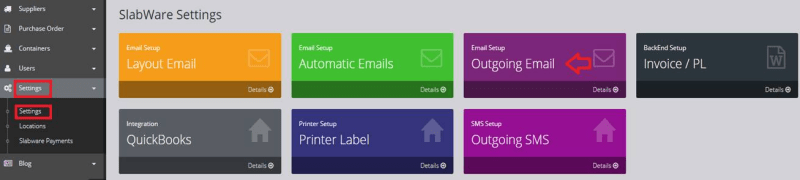
By configuring the Outgoing email SlabWare will send you notifications about your inventory management, including payment reminder, stock level, etc.
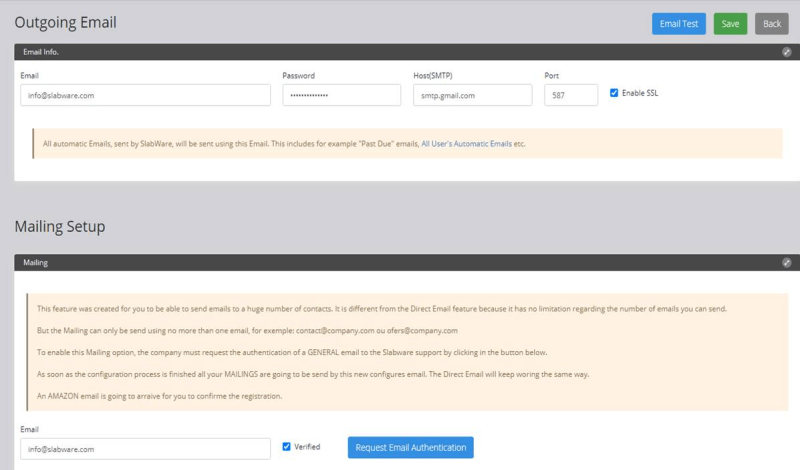
Here you just need to fill in your email address, the password must be the same as this very email.
Make sure your email password does not contain any special characters (ex: @;!;*) otherwise it will not work.
Find the Host and Port of your email server. Next, save and then hit Email Test.
If everything is correct, you will receive a confirmation email.
The Mailing setup is important to allow you to send email to a massive number of contacts at once, no limit.
Simply tap the email address and click on Request Email Authentication.
Once you request the authentication, you will receive an email from Amazon. Click on the link to confirm it and now you´ll be able to use the Mailing feature!
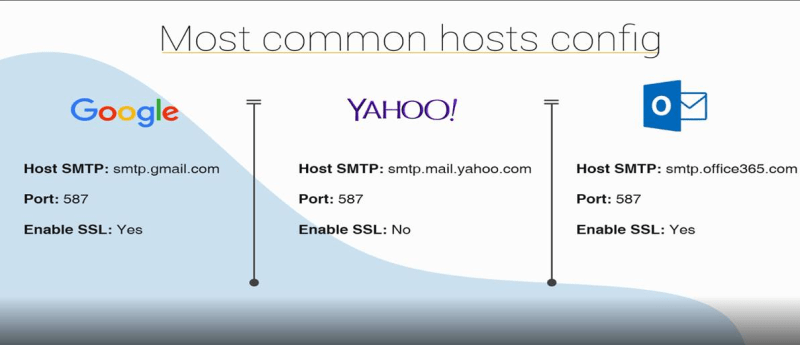
Here’s the most commonly used email hosts. If you can´t find it here, please contact us so we can help you!
Keep reading